Describe arrival before amenities
Record the island, settlement or neighbourhood, road, dock, ferry or air context where relevant, onward travel, nearby services, site conditions, project status, phase plan, media, and enquiry settings.
The serious buyer asks how the property is reached, whether water and sewer infrastructure exists or is included, how power is supplied, what the current phase contains, and which planning or building record applies. estateTT keeps those questions attached to the exact island, lot or unit, source, and next responder.
estateTT developer account
Projects, units, buyer activity, and team work
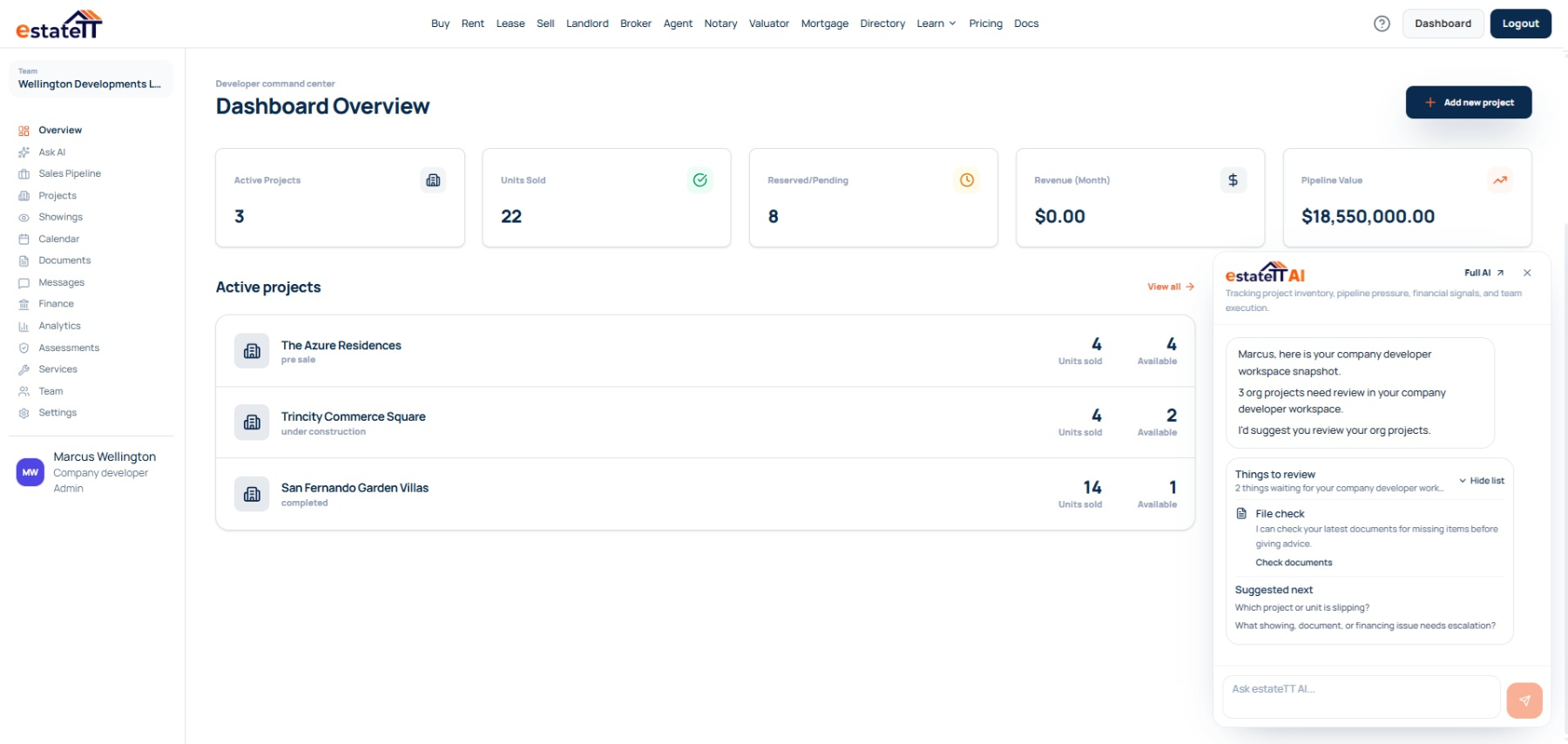
Set up
Create the project record
Add units
Publish current inventory
Manage interest
Keep buyer activity visible
Coordinate
Connect records and people
Move forward
Track the next stage
Start with the operating record
“Utilities available” is too vague when the answer may differ by lot or phase. Show what is already in place, what the developer plans to include, what remains pending, and what the buyer may need to arrange. Use the developer workspace to connect the place, access model, proposed services, phase, inventory, buyer activity, and professional evidence behind the offer.
Record the island, settlement or neighbourhood, road, dock, ferry or air context where relevant, onward travel, nearby services, site conditions, project status, phase plan, media, and enquiry settings.
Give every lot, villa, apartment, or residence its own phase, price, availability, dimensions, specifications, utility details, infrastructure inclusions, access notes, and supporting material. Show whether something exists, is proposed, is included, or remains for the buyer to arrange.
Connect the preferred property to travel constraints, virtual viewings, representative visits, service questions, requested documents, messages, and the next action so an expensive visit is used to verify—not discover—the basics.
Where project momentum starts to fragment
Beautiful island imagery attracts attention. Buyer confidence depends on equally clear information about access, water, sewerage, power, drainage, site works, construction status, and who is delivering what.
A buyer needs to understand the route from airport, ferry, dock, or main road to the property and how weather, schedules, or unfinished infrastructure may affect a visit. Marketing shorthand should not replace practical access context.
Water, sewer, power, communications, roads, drainage, or dock access may differ by phase or parcel. Attach confirmations and open questions to the affected inventory instead of repeating one broad answer across the project.
A remote buyer arrives and only then asks for plans, service evidence, boundary information, construction status, costs, or professional contacts. The visit becomes an information-gathering exercise instead of a decision point.
The developer workspace
Keep every project tied to its actual island and settlement, then manage phases, inventory, utilities, access, buyer questions, visits, documents, finances, and follow-up without carrying one project’s assumptions into another.
An individual developer can manage one focused project directly. A company account can connect sales, project, finance, operations, and island-based teams across a wider portfolio while controlling access.
Keep the settlement, arrival routes, local access, site context, nearby services, phase plan, media, and current project position together.
Record price, availability, specifications, water, sewerage, power, roads, drainage, communications, dock access, and other relevant infrastructure for each property.
Connect virtual viewings, travel plans, representative visits, questions, shared records, messages, and next actions to the property being considered.
Review team access, calendars, project financial records, payment milestones, pipeline movement, analytics, and recent activity across the portfolio.
The developer journey
The account becomes more useful as the work moves from project setup into inventory, buyer activity, transaction coordination, and the professional work around each unit.
01
Record the island, settlement, airport, ferry, dock, road, onward travel, nearby services, site conditions, phase plan, project status, media, and enquiry settings that shape practical access.
02
Give every lot or unit its own price, availability, dimensions, specifications, water, sewerage, power, road, drainage, communications, dock or other relevant infrastructure context and source material.
03
Use messages, shared media, virtual viewings, documents, representative visits, and a clear list of open questions to narrow the buyer’s options before travel.
04
Attach observations, photographs, access concerns, service questions, construction notes, and requested evidence to the exact property and responsible responder.
05
Keep the buyer, inventory item, documents, appointments, pipeline stage, and financial record connected as utilities, planning, building, survey, insurance, financing, valuation, legal, payment, and construction work proceeds.
A connected project still needs qualified people
estateTT gives the developer team a property-aware operating workspace. It does not become the person responsible for project approvals, professional advice, funds, construction, or the legal transaction.
Manage project information, inventory, buyer conversations, and internal follow-up from the developer workspace.
Provide the planning, legal, valuation, lending, payment, construction, inspection, and other professional work the project and buyer require.
What the developer account helps organize
Create project records and manage unit context
Keep buyer interest, showings, messages, and pipeline stages visible
Organize project documents, team activity, calendars, and financial records
Use workspace context to prepare the next conversation and handoff
What estateTT does not decide
Approve planning, environmental, or construction work
Give legal advice, decide title, or complete a transfer
Approve financing, buyer eligibility, or valuation conclusions
Hold funds, release payments, or decide transaction outcomes
Account-aware AI
estateTT AI can help surface an unanswered question from an off-island buyer, a lot record missing utility details, or a planned visit that still lacks documents. It cannot verify access, infrastructure, permits, construction quality, insurability, value, title, financing, or legal questions.
Review supported messages and appointments for buyers who still need practical arrival, viewing, representative, or island-access information before committing to a trip.
Bring the island, project, phase, exact lot or unit, infrastructure notes, source records, and recent buyer activity together before the team replies.
Planning and building authorities, utility providers, engineers, surveyors, insurers, attorneys, valuators, lenders, and contractors must confirm the matters that depend on their authority or professional work.
Bring in the right support
Move the buyer or development team into the relevant account, financing-preparation, or professional-support route with the island and property question intact.
Choose an individual workspace for one focused project or a company account for controlled team access across several islands or developments.
Help a financing-dependent buyer organize income, debt, deposit, property, insurance, and supporting-document questions before approaching a lender.
Move ownership, title, contract, signing, permit-condition, and transfer questions to an appropriate Bahamian legal professional.
Questions before you set up
No. The workspace can record what the developer currently understands, the supporting document and date, the affected lot or phase, and any open questions. WSC, the relevant provider, or a qualified professional must confirm the actual service details.
WSC’s published buyer guidance distinguishes utilities already in place from infrastructure the developer may include later or the buyer may have to fund. The answer can therefore differ across phases or parcels and should not be represented by one project-wide label.
Yes. Keep each project’s island, access, inventory, utilities, documents, team, buyer pipeline, financial records, and activity separate. A company account also lets you control access across the wider team.
No. Planning, building, and Family Island authorities retain their official roles. estateTT keeps the relevant references, buyer questions, and team follow-up together while those processes continue elsewhere.
No. The developer, buyer, relevant authorities, and qualified professionals remain responsible for reservation money, financing, title, legal advice, valuation, insurance, surveys, permits, inspections, construction certification, buyer acceptance, and transfer.
The project page is the beginning, not the operating system.
Create the developer account, clarify access and utilities for every project and inventory item, then prepare serious buyers before the next call, document request, or island visit.
estateTT is a technology provider that delivers specialized workflow and organization tools for real estate platform participants in The Bahamas. estateTT is not a real estate agency, brokerage, legal firm, or financial institution. The platform does not make title, lending, landholding-license, fee, deposit, or transaction-outcome decisions. While the platform reserves the right to review participants to maintain network quality, it does not certify professional credentials or replace independent checks. Users are solely responsible for independently verifying all transaction details, licensing, and legal requirements with qualified local professionals and relevant Bahamian regulatory authorities before engagement.