Show buyers what the project offers
Record the parish, neighbourhood, access, phase plan, intended unit mix, amenities, media, and project status so a buyer can understand what is being offered without relying on a brochure alone.
The render earns attention. Then buyers ask about planning status, phase release, service readiness, unit specifications, payment milestones, and who will answer next. estateTT gives the development team a working project record and a buyer pipeline built for that conversation.
estateTT developer account
Projects, units, buyer activity, and team work
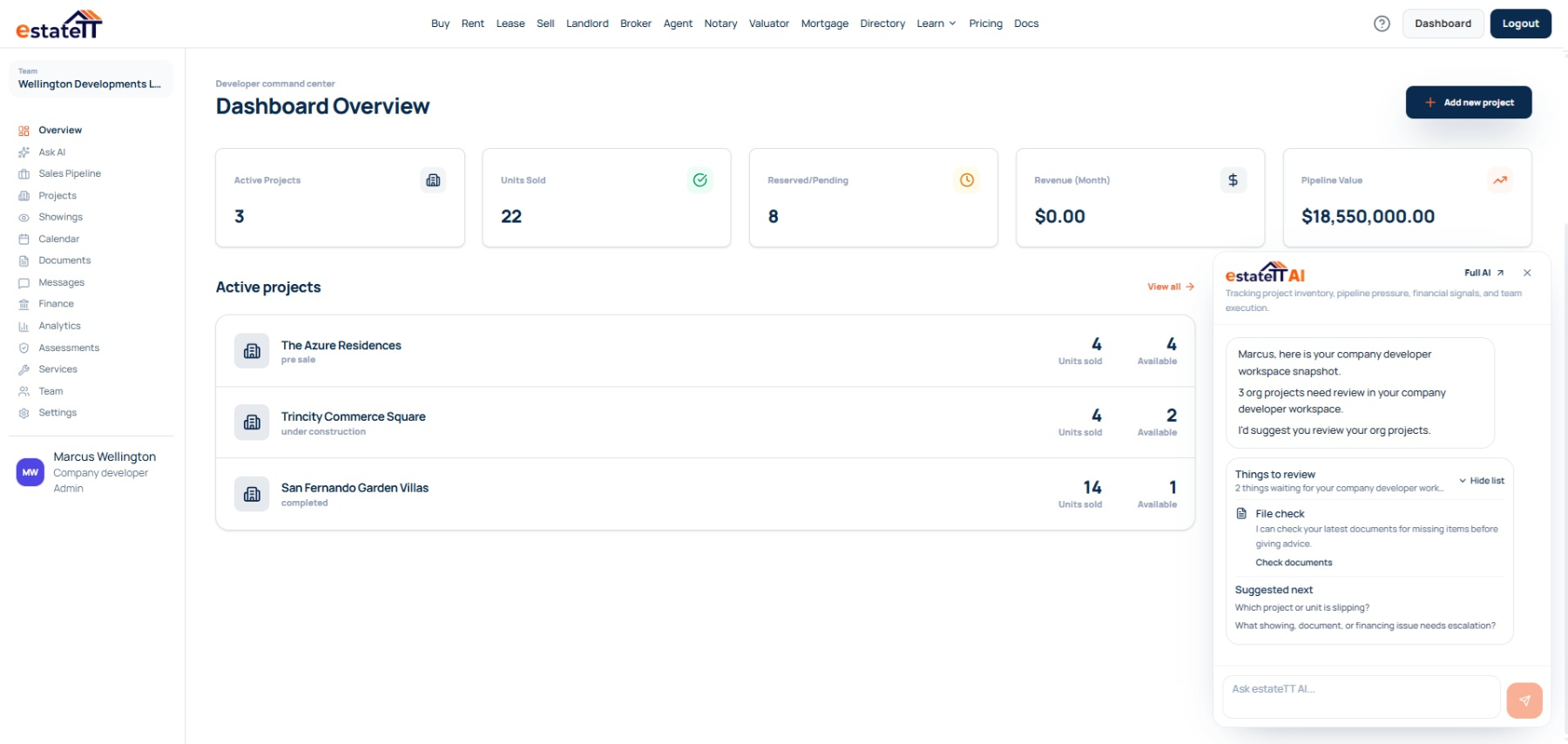
Set up
Create the project record
Add units
Publish current inventory
Manage interest
Keep buyer activity visible
Coordinate
Connect records and people
Move forward
Track the next stage
Start with the operating record
Planning applications and status updates belong in the Planning and Development Department’s ePortal, and some applications require public notice. On estateTT, buyers need a clear account of what has been submitted, what is still pending, and how that affects the phase or unit they are considering. estateTT keeps the sales conversation connected to the latest project information, so buyers receive clearer answers while official and professional work continues through the appropriate channels.
Record the parish, neighbourhood, access, phase plan, intended unit mix, amenities, media, and project status so a buyer can understand what is being offered without relying on a brochure alone.
Give each phase and unit its own specifications, price, availability, supporting material, and release context. The team can answer “Is this unit available?” without confusing that answer with the status of the wider development.
Connect the buyer, preferred unit, questions, viewing, documents, messages, and next action. When interest becomes serious, the sales team can see whether the answer belongs with the developer, lender, attorney, valuator, utility provider, or another professional.
Where project momentum starts to fragment
Barbados buyers can compare polished developments quickly. Confidence drops when the project team cannot connect a claim on the page to the latest unit details, utility information, supporting document, or person who can answer for it.
An application may be progressing while the sales team is still repeating an older status. Record the latest update, its source and date, the affected phase, and who owns the follow-up before the old wording reaches more buyers.
Water, wastewater, electricity, metering, roads, and site access can shape a buyer’s decision. Keep confirmed details and open questions with the relevant phase or unit so the sales team does not overstate what is available.
An agent, sales representative, project manager, attorney, or lender may enter the conversation at different times. Without a shared file, the buyer has to reconcile the project team instead of evaluating the property.
The developer workspace
Bring phases, units, prices, availability, media, buyer questions, viewings, documents, financial records, and follow-up into one working account behind the public project page.
An independent developer can manage one focused project. A development company can bring sales, project, finance, and operations staff into the same account while controlling what each person can see and do.
Keep the site, parish, phase structure, media, status notes, documents, and the source and date of important updates together.
Connect each unit’s specifications, price, availability, buyer interest, viewing history, and open questions.
Assign the next response and keep messages, appointments, documents, and professional requests visible to the people involved.
Review buyer activity, project finances, payment milestones, calendars, analytics, and recent account activity.
The developer journey
The account becomes more useful as the work moves from project setup into inventory, buyer activity, transaction coordination, and the professional work around each unit.
01
Describe the site, parish, neighbourhood, access, intended phases, amenities, status, media, and enquiry settings in the language your sales team can maintain.
02
Create the phase and unit records with their own specifications, pricing, availability, supporting material, and release context.
03
Connect the enquiry to the relevant unit and record whether the concern is availability, planning status, services, financing, documents, viewing, payment timing, or professional advice.
04
Assign the next action to the project, sales, finance, legal, valuation, utility, construction, or other responsible person and preserve the response with the active file.
05
Keep the buyer, unit, documents, appointments, pipeline stage, and financial record connected as qualified professionals take over the decisions that belong to them.
A connected project still needs qualified people
estateTT gives the developer team a property-aware operating workspace. It does not become the person responsible for project approvals, professional advice, funds, construction, or the legal transaction.
Manage project information, inventory, buyer conversations, and internal follow-up from the developer workspace.
Provide the planning, legal, valuation, lending, payment, construction, inspection, and other professional work the project and buyer require.
What the developer account helps organize
Create project records and manage unit context
Keep buyer interest, showings, messages, and pipeline stages visible
Organize project documents, team activity, calendars, and financial records
Use workspace context to prepare the next conversation and handoff
What estateTT does not decide
Approve planning, environmental, or construction work
Give legal advice, decide title, or complete a transfer
Approve financing, buyer eligibility, or valuation conclusions
Hold funds, release payments, or decide transaction outcomes
Account-aware AI
From inside the developer workspace, estateTT AI can help you review supported account activity: which buyer question is still open, which unit conversation has gone quiet, or which record needs a human check. It cannot verify an approval or speak for BWA, Barbados Light & Power, a lender, attorney, valuator, engineer, or planner.
Review supported messages and pipeline activity to identify buyer questions that still need a response or assignment.
Bring the relevant project, phase, unit, buyer, documents, and recent activity into view before the team decides what to do next.
The relevant authority or qualified professional must confirm approvals, utility capacity, construction quality, value, financing, title, legal questions, and payment release.
Bring in the right support
Move the buyer or development team into the relevant estateTT route without losing the question that triggered the handoff.
Choose between an individual developer workspace and a company account with broader team access.
Help a financing-dependent buyer organize income, debt, deposit, property, and document questions before approaching a lender.
Move title, contract, ownership, signing, and transfer questions to an appropriate legal professional with the project context attached.
Questions before you set up
You can record the application reference, internal status notes, documents, dates, and responsible team member. The official application, payment, monitoring, and decision remain with the Planning and Development Department and its ePortal; estateTT does not replace or verify that system.
Record only what the responsible provider or qualified professional has confirmed, together with the source and date. BWA is responsible for public water and relevant wastewater services, while Barbados Light & Power manages electricity service and connection requirements.
No. Your team controls what is published or shared, and can limit confidential, privileged, financial, or restricted material to the appropriate people.
No. estateTT can record workflow status and related information, but it does not hold reservation funds, approve financing, accept a buyer, certify documents, or complete a transfer.
Use an individual account when one developer is managing the work directly. Choose a company account when sales, project, finance, or operations staff need different levels of access across one or more developments.
The project page is the beginning, not the operating system.
Create the developer account, add the project and its units, then give every serious buyer question a clear owner and a visible next action.
estateTT is a technology provider that delivers specialized workflow and organization tools for real estate platform participants in Barbados. estateTT is not a real estate agency, brokerage, legal firm, or financial institution. The platform does not make title, lending, landholding-license, fee, deposit, or transaction-outcome decisions. While the platform reserves the right to review participants to maintain network quality, it does not certify professional credentials or replace independent checks. Users are solely responsible for independently verifying all transaction details, licensing, and legal requirements with qualified local professionals and relevant Barbados regulatory authorities before engagement.