Set up the project precisely
Record the island, district, block and parcel where relevant, site access, proposed development, phases, current status, planning references, media, and project contacts.
Connect each project, phase, parcel or unit to its planning and construction records, utilities, specifications, availability, buyer questions, visits, documents, and team follow-up.
estateTT developer account
Projects, units, buyer activity, and team work
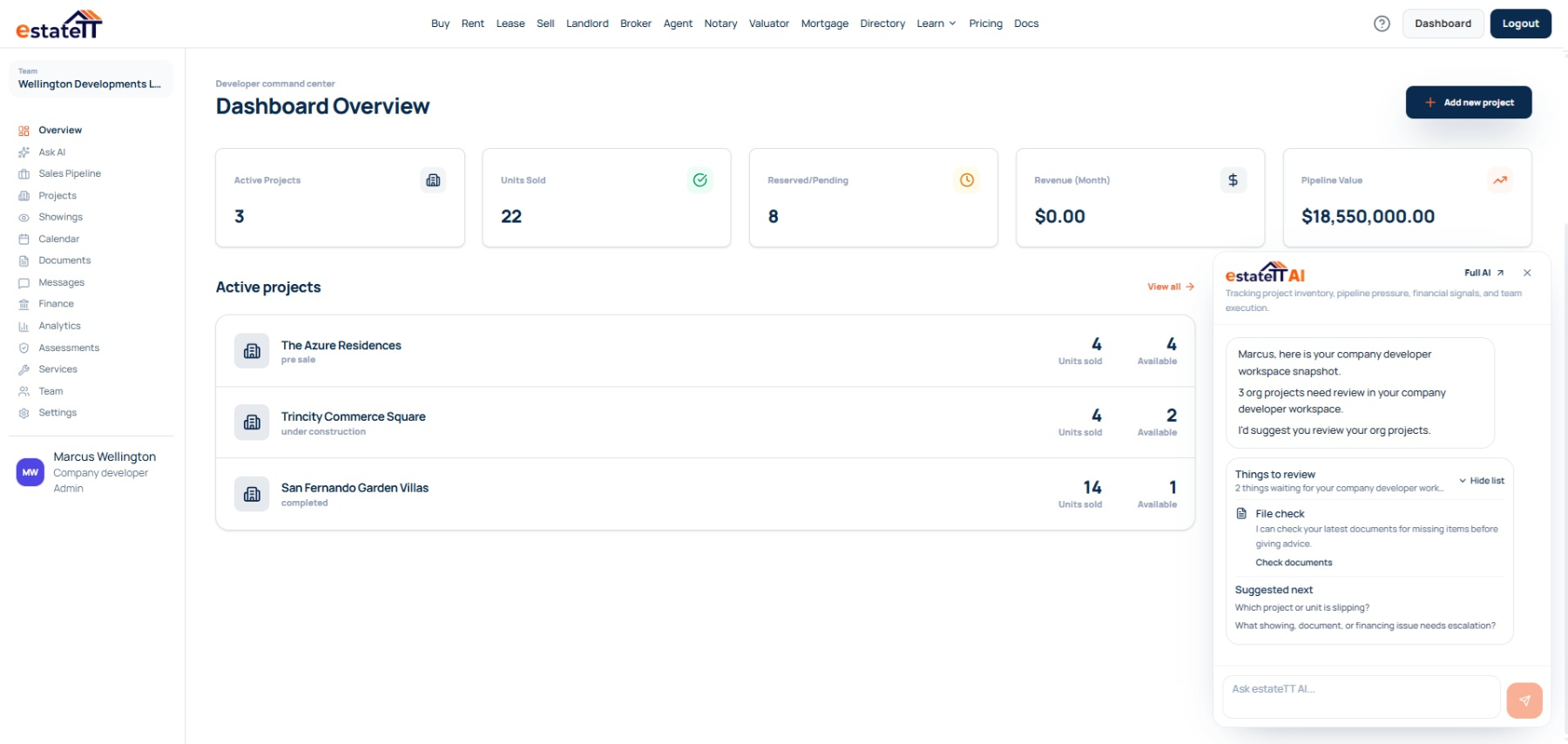
Set up
Create the project record
Add units
Publish current inventory
Manage interest
Keep buyer activity visible
Coordinate
Connect records and people
Move forward
Track the next stage
Start with the operating record
A project-wide status can hide important differences between phases and units. Keep the planning reference, building-control stage, utility requirement, construction update, and supporting document with the exact property they affect. The Department of Planning handles development applications, permits, inspections, and final certificates. estateTT keeps the sellable inventory, buyer activity, supporting records, and team follow-up organised around that work.
Record the island, district, block and parcel where relevant, site access, proposed development, phases, current status, planning references, media, and project contacts.
Give each parcel, residence, apartment, or commercial unit its own price, availability, floor plan, specifications, utility details, construction status, supporting records, and open questions.
Keep budget, intended use, preferred unit, financing questions, visits, messages, requested documents, offers, and the next response together.
Where project momentum starts to fragment
Buyers need to know what applies to the property they are considering—not simply what is true somewhere within the wider development.
A planning decision, building permit, inspection, and final certificate do not mean the same thing. Keep the current stage, source, date, affected phase or unit, and person responsible for confirming it visible.
New construction or a larger electrical service may require early coordination, infrastructure work, and Building Control inspection. Keep those details with the exact property and project team.
Floor plans, specifications, construction updates, utility questions, visits, offers, and professional requests sit in separate conversations with no clear owner or visible next action.
The developer workspace
Choose an individual account for one focused development or a company account when sales, projects, finance, operations, and professional contributors need controlled access.
Manage sites, phases, parcels, units, planning and construction records, utilities, documents, buyer enquiries, visits, offers, financial records, calendars, analytics, and team follow-up in one account.
Keep the island, district, block and parcel, access, phases, planning references, building-control stages, media, documents, and contacts together.
Track floor plans, specifications, price, availability, utilities, construction status, supporting records, interest, visits, and open questions for every property.
Give sales, project, finance, operations, and professional contributors access to the work they need without exposing everything.
Keep enquiries, preferred units, messages, appointments, requested documents, offers, and next actions together.
The developer journey
The account becomes more useful as the work moves from project setup into inventory, buyer activity, transaction coordination, and the professional work around each unit.
01
Record the island, district, block and parcel where relevant, access, proposed development, phases, current status, planning references, media, and project contacts.
02
Create each parcel or unit with its own price, availability, floor plan, specifications, utility details, construction status, media, and supporting documents.
03
Keep the buyer’s budget, intended use, preferred unit, financing questions, visits, messages, offers, and requested documents together.
04
Route each open question to the right project lead, planning or utility contact, surveyor, engineer, attorney, lender, valuator, contractor, or other qualified professional.
05
Carry confirmed property information, documents, appointments, messages, and professional follow-up into financing, legal review, or the next agreed step.
A connected project still needs qualified people
estateTT gives the developer team a property-aware operating workspace. It does not become the person responsible for project approvals, professional advice, funds, construction, or the legal transaction.
Manage project information, inventory, buyer conversations, and internal follow-up from the developer workspace.
Provide the planning, legal, valuation, lending, payment, construction, inspection, and other professional work the project and buyer require.
What the developer account helps organize
Create project records and manage unit context
Keep buyer interest, showings, messages, and pipeline stages visible
Organize project documents, team activity, calendars, and financial records
Use workspace context to prepare the next conversation and handoff
What estateTT does not decide
Approve planning, environmental, or construction work
Give legal advice, decide title, or complete a transfer
Approve financing, buyer eligibility, or valuation conclusions
Hold funds, release payments, or decide transaction outcomes
Account-aware AI
estateTT AI can review supported workspace activity for incomplete property records, unanswered buyer questions, and follow-up that has gone quiet. It helps recover the thread without making official or professional decisions.
Find a property missing its floor plan, specification, utility detail, construction stage, price, availability, source document, or current update before the team repeats an incomplete answer.
Bring the buyer, preferred property, questions, visits, requested documents, messages, offer activity, and next action back into view when the conversation goes quiet.
estateTT AI cannot determine planning permission, permits, inspections, utility availability, strata or title matters, construction quality, value, financing, legal questions, or completion dates.
Bring in the right support
Keep the project and chosen property connected while the buyer prepares financing or seeks professional support.
Choose a company account for shared project, inventory, buyer, document, finance, and team operations.
Help the buyer assess document readiness before a lender or mortgage professional requests the full package.
Move title, strata, contract, signing, and transfer questions to an appropriate legal professional with the property details attached.
Questions before you set up
Yes. Keep each project’s island, district, block and parcel, phases, inventory, utilities, planning and construction records, documents, team, buyer activity, finances, and recent work distinct inside the company account.
No. estateTT can store references, documents, dates, internal notes, and follow-up. The Department of Planning, CUC, Water Authority Cayman, or a qualified professional must confirm the official or technical position.
Yes. Track floor plans, specifications, price, availability, electricity, water or sewerage details, construction stage, documents, buyer interest, visits, and open questions separately for each property.
No. The developer, buyer, relevant authorities, and qualified professionals remain responsible for funds, buyer acceptance, financing, valuation, title, strata matters, contracts, permits, utilities, surveys, inspections, construction certification, and transfer.
The project page is the beginning, not the operating system.
Create the developer account, add the project and inventory, then keep planning and construction records, documents, buyer activity, visits, and team follow-up connected.
estateTT is a technology provider that delivers specialized workflow and organization tools for real estate platform participants in the Cayman Islands. estateTT is not a real estate agency, brokerage, legal firm, or financial institution. The platform does not make title, lending, landholding-license, fee, deposit, or transaction-outcome decisions. While the platform reserves the right to review participants to maintain network quality, it does not certify professional credentials or replace independent checks. Users are solely responsible for independently verifying all transaction details, licensing, and legal requirements with qualified local professionals and relevant Cayman Islands regulatory authorities before engagement.