Define the project once
Create the project record with its location, status, completion context, marketing details, media, and buyer-enquiry settings so the team begins from one operating record instead of a collection of drafts.
Set up the project, publish the unit context, and give your team one place to work through buyer interest as it becomes showings, reservations, documents, payment milestones, and the next professional conversation.
estateTT developer account
Projects, units, buyer activity, and team work
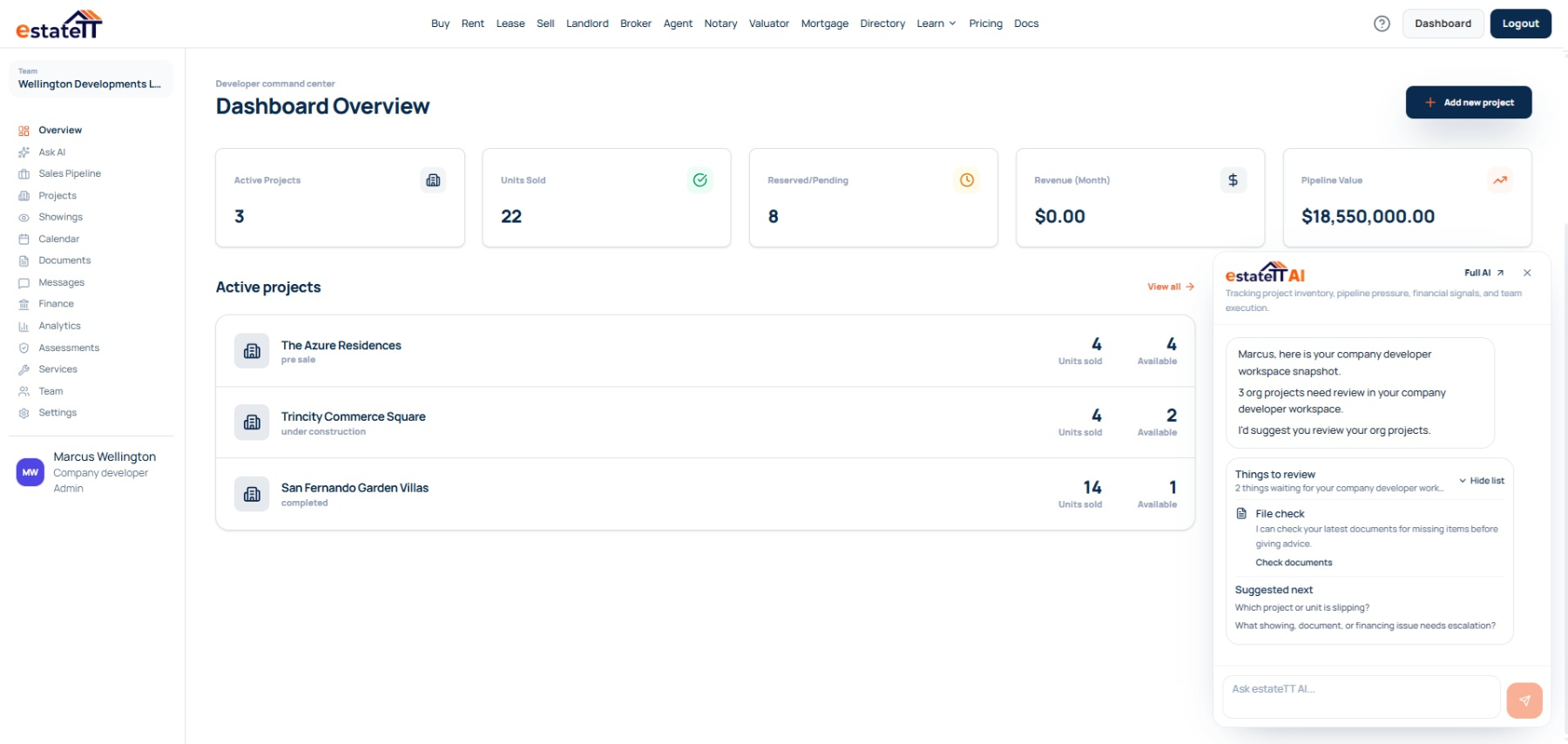
Set up
Create the project record
Add units
Publish current inventory
Manage interest
Keep buyer activity visible
Coordinate
Connect records and people
Move forward
Track the next stage
Start with the operating record
A brochure can start the conversation, but a serious buyer soon needs a reliable answer about the specific unit, its status, the project documents, and who owns the next response. That work becomes difficult when project, sales, and buyer information live in separate places. The developer workspace connects the project setup, unit inventory, buyer pipeline, messages, documents, showings, team work, financial records, and account activity around the same development.
Create the project record with its location, status, completion context, marketing details, media, and buyer-enquiry settings so the team begins from one operating record instead of a collection of drafts.
Manage units against the project with their number, type, pricing, availability, specifications, and supporting material. The buyer conversation can stay attached to the unit being discussed.
Follow buyer interest through the sales pipeline, with messages, showings, documents, follow-up, and status changes visible to the people responsible for moving the next step forward.
Where project momentum starts to fragment
The problem is rarely a lack of interest. It is a unit marked differently in two places, a buyer question without an owner, or a document and payment milestone that is not visible when the next decision needs to be made.
A unit, its availability, and its terms need a single working context. When sales activity is disconnected from inventory, a team can lose time reconciling what was discussed with what is actually current.
A message, showing, or reservation follow-up can stall while each person assumes someone else is handling it. A visible pipeline makes the quiet gaps easier for the sales and project team to notice.
Documents, payment records, buyer readiness, legal work, lending, inspections, and handover each have their own owner. The platform keeps the project context organized; qualified people remain responsible for their decisions and work.
The developer workspace
A developer account is where the project record becomes usable to the team: create projects, add units, manage buyer interest, attach documents, coordinate follow-up, and keep the current work in view.
Independent developers can run their own workspace. Development companies can create an organization account and bring the people responsible for sales, projects, finance, and operations into the same role-aware environment.
Create project records and manage unit details, availability, pricing, media, and buyer-enquiry settings.
Keep buyer interest, messages, showings, reservations, and next actions connected to the relevant project and unit.
Keep project materials available to the team and coordinate the people who need to act on the next stage.
Review project financial records, payment milestones, analytics, calendars, and account activity in the workspace.
The developer journey
The account becomes more useful as the work moves from project setup into inventory, buyer activity, transaction coordination, and the professional work around each unit.
01
Create the project record with the development details, location, status, marketing information, media, and enquiry settings the team needs to work from.
02
Give each unit its own number, type, pricing, availability, specifications, and supporting material so buyer activity has the right context.
03
Use the sales pipeline to keep buyer interest, messages, showings, and next actions visible as a conversation becomes more serious.
04
Keep project documents, buyer records, related activity, and the responsible team members connected while the next decision is still being made.
05
Track the pipeline stage and project financial record while lenders, attorneys, valuators, inspectors, contractors, and other professionals handle work that remains theirs to decide.
A connected project still needs qualified people
estateTT gives the developer team a property-aware operating workspace. It does not become the person responsible for project approvals, professional advice, funds, construction, or the legal transaction.
Manage project information, inventory, buyer conversations, and internal follow-up from the developer workspace.
Provide the planning, legal, valuation, lending, payment, construction, inspection, and other professional work the project and buyer require.
What the developer account helps organize
Create project records and manage unit context
Keep buyer interest, showings, messages, and pipeline stages visible
Organize project documents, team activity, calendars, and financial records
Use workspace context to prepare the next conversation and handoff
What estateTT does not decide
Approve planning, environmental, or construction work
Give legal advice, decide title, or complete a transfer
Approve financing, buyer eligibility, or valuation conclusions
Hold funds, release payments, or decide transaction outcomes
Account-aware AI
estateTT AI can help surface supported workspace activity that may deserve attention, such as an unanswered buyer conversation, a quiet pipeline item, or a document and unit context that needs review. It does not make planning, investment, legal, lending, or construction decisions.
Use supported account context to review buyer conversations and pipeline activity that may need a response from the sales team, project team, buyer, or qualified professional.
Ask from the developer workspace instead of reconstructing the project, unit, documents, and recent buyer activity from memory or separate tools.
estateTT AI does not decide approvals, costs, value, title, construction quality, buyer eligibility, payment release, or transaction outcomes. It helps the team organize the questions for the right person.
Bring in the right support
Use the next route when a buyer needs to prepare for financing, locate a professional service, or understand the account and subscription options for your development team.
Compare account plans for an independent developer or a development company that needs broader operating visibility.
Give a prospective buyer a tool to identify document gaps before their lender conversation becomes time-sensitive.
Help buyers find the right professional conversation when the project move reaches legal documents and transfer work.
Questions before you set up
The workspace supports projects, unit inventory, buyer interest, messages, showings, documents, team activity, financial records, analytics, and related operating work. Whether it replaces another CRM depends on the systems your team already uses and the work you choose to keep in estateTT.
Yes. Independent developers can create an individual developer account. Development companies can create a company developer account and bring team members into a role-aware workspace for multi-project work.
No. Payments and funds remain with the developer's designated financial arrangements and qualified professionals. estateTT records and organizes workflow information; it does not hold funds, approve a buyer, accept a reservation, or complete a legal transfer.
Yes. The developer workspace is structured around project records and their unit, buyer, document, pipeline, financial, and team activity. Development companies can operate from a company account when a broader team needs shared access.
Planning, environmental, construction, valuation, financing, title, legal advice, payment handling, inspections, and transaction decisions remain with the relevant qualified professionals and institutions. estateTT helps keep the relevant context organized for those conversations.
The project page is the beginning, not the operating system.
Choose the developer account that fits how you operate, then bring your projects, units, buyer pipeline, documents, and team activity into one working view.
estateTT is a technology provider that delivers specialized workflow and organization tools for real estate platform participants in Trinidad and Tobago. estateTT is not a real estate agency, brokerage, legal firm, or financial institution. The platform does not make title, lending, landholding-license, fee, deposit, or transaction-outcome decisions. While the platform reserves the right to review participants to maintain network quality, it does not certify professional credentials or replace independent checks. Users are solely responsible for independently verifying all transaction details, licensing, and legal requirements with qualified local professionals and relevant Trinidad and Tobago regulatory authorities before engagement.