Describe the property as it stands
Add the address, property type, rooms, floor and land area, features, images and description that buyers will use to decide whether to enquire or arrange a viewing.
Prepare the property details, create the listing, follow buyer activity, review pending offers and keep documents, appointments and professional conversations connected as the sale develops.
estateTT seller account
The property and the work around it
Prepare
Build the property record
List
Publish what buyers need
Track interest
Follow activity and visits
Review offers
See what has arrived
Coordinate
Keep the sale moving
Before the listing goes live
A seller may begin with an asking price and a few photographs. Serious interest usually asks for more: accurate property details, access for appointments, supporting records, clear replies and the right professional involvement.
The seller account gives the listing and the work around it a shared starting point. Build what you can, flag what still needs professional input and keep the current version easier to find.
Add the address, property type, rooms, floor and land area, features, images and description that buyers will use to decide whether to enquire or arrange a viewing.
Set the listing price you want to present, while keeping valuation requests and supporting property context available when a qualified valuator or other professional needs to assess it.
Keep ownership, survey, planning, maintenance, WASA, T&TEC and other relevant property records available for the attorney, valuator, agent or buyer conversation that may require them.
Where a sale starts to fragment
A seller can lose the thread without losing the buyer: one enquiry sits in messages, a viewing changes, an offer arrives and a professional asks for a document that is somewhere else.
A price changes, a photograph is outdated or an important feature is described differently in two conversations. Keep the live listing as the shared reference and update it when the property story changes.
Viewings, valuation visits, document consultations and buyer questions can create separate dates and message threads. Keep the calendar and conversations inside the seller workspace.
The amount matters, but so do the property, buyer, timing, conditions and professional advice around it. The account keeps pending offers visible; the decision remains yours with the professionals you appoint.
Individual seller account
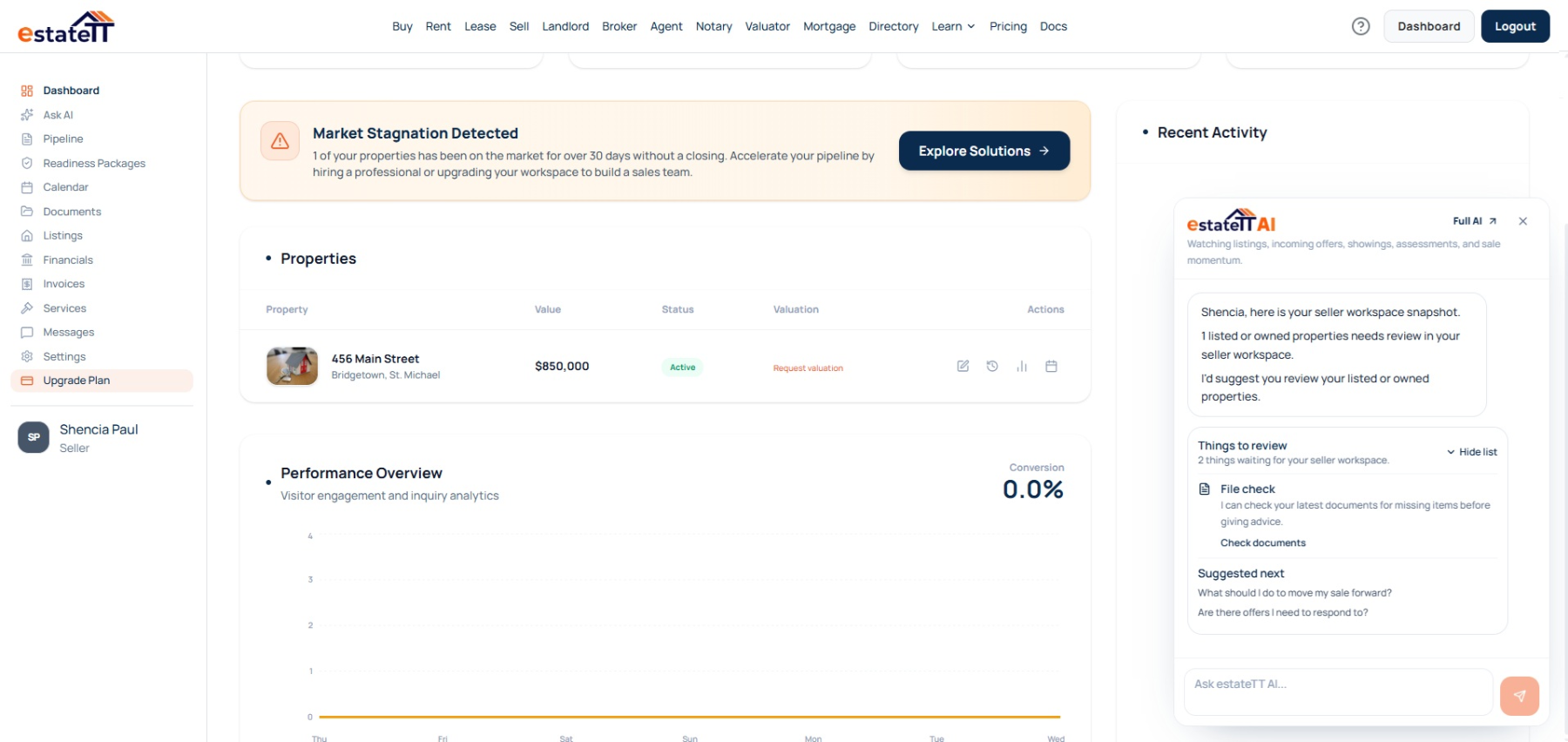
Your seller dashboard brings the live property record together with pending offers, messages, documents, appointments, valuation and service requests, and the activity around the listing.
That continuity matters when a property in Trinidad or Tobago moves from early interest into viewings, professional questions and decisions that need current information.
Create and update the property details, asking price, status, images and description buyers see.
See listing activity and pending offers without rebuilding the conversation from separate messages.
Keep property records and scheduled visits available as valuators, agents and legal professionals become involved.
Use messages, service requests and the seller pipeline to keep open work visible around the property.
The seller journey
The page should not end at “list now.” The account becomes more useful as the property moves from preparation into buyer attention, offers and professional coordination.
01
Gather the property facts, images and records you can confirm, then note the pricing, planning, ownership or legal questions that need qualified input.
02
Create the sale listing with its asking price, location, property details, features, images and current status.
03
Follow listing activity, messages and appointments as buyers begin asking questions or arranging access.
04
Keep pending offers visible beside the property and take professional advice before accepting, rejecting or negotiating any terms.
05
Keep documents, appointments, messages and service requests available as the attorney, valuator, agent or other professionals move their part forward.
A connected sale still needs qualified people
estateTT supports the seller’s workflow. It does not become the professional responsible for value, title, advice, negotiation or transfer.
Support marketing, buyer communication, viewings and negotiation where you choose to appoint one.
Provide the professional valuation judgment that an asking-price field or automated tool cannot replace.
Handle land-title documents, legal advice, transaction terms and the legal work required to transfer the property.
Address surveys, planning, inspections, repairs or financing questions when the property and sale require them.
What the seller account helps organize
Create and update the property listing
Keep pending offers and buyer activity visible
Organize property documents and appointments
Connect messages, service requests and follow-up
What estateTT does not decide
Set or certify the property’s market value
Confirm title, ownership rights or planning compliance
Negotiate or accept an offer on the seller’s behalf
Hold buyer funds or complete the legal transfer
Account-aware AI
estateTT AI works inside the seller account. It can help you review supported account activity and bring possible gaps or outstanding work back into view without making the property, pricing, legal or negotiation decisions for you.
Ask about supported listing, document and offer activity already connected to your account instead of explaining the property from the beginning each time.
Surface supported reminders about missing information, outstanding documents or seller activity that may deserve your attention.
estateTT AI does not value the property, negotiate with buyers, interpret title or replace an agent, valuator, Attorney-at-Law or other qualified professional.
Bring in the right support
Choose the route that helps you answer the next serious question about price, buyer interest, or the professional work around the sale.
Prepare valuation context before negotiation, lender requirements, or buyer questions test the price.
Use agent support to manage listings, serious enquiries, viewings, client notes, and follow-up.
Organize title, document, party, and closing context before professional review begins.
Questions before you list
Yes. The individual seller account lets you create and update a sale listing with its property details, asking price, status, images and description. Decide separately whether you also want an agent or broker to handle marketing and negotiations.
No. estateTT lets you enter an asking price and organize property context, but it does not determine market value. Engage a qualified valuator when you need a professional valuation.
No. estateTT does not hold buyer funds, transfer title or provide legal advice. Trinidad and Tobago Registrar General Land Registry guidance says land-title documents are prepared and signed by an Attorney-at-Law, so keep title and transaction decisions with the qualified professionals handling the sale.
The listing is the beginning, not the whole sale.
Create the individual seller account built for listings, buyer interest, documents, appointments, offers and professional follow-up in Trinidad and Tobago.
estateTT is a technology provider that delivers specialized workflow and organization tools for real estate platform participants in Trinidad and Tobago. estateTT is not a real estate agency, brokerage, legal firm, or financial institution. The platform does not make title, lending, landholding-license, fee, deposit, or transaction-outcome decisions. While the platform reserves the right to review participants to maintain network quality, it does not certify professional credentials or replace independent checks. Users are solely responsible for independently verifying all transaction details, licensing, and legal requirements with qualified local professionals and relevant Trinidad and Tobago regulatory authorities before engagement.